At a glance
The four things most people want to know first. Every detail, with its source, is in the full table below.
| App | No account | Drives stay on the phone | Records on its own | Free |
|---|---|---|---|---|
| DashLog | ✓Yes | ✓Yes | ✓Yes | ✓Yes |
| myTracks | ✓Yes | ✓Yes | Daily track | Partly |
| Driving Tracker | ✓Yes | ✓Yes | Premium | Partly |
| Geo Tracker | –Not stated | ✓Yes | ✗No | ✓Yes |
| Google Maps Timeline | ✗No | By default | ✓Yes | ✓Yes |
| Apple Maps Visited Places | –Not stated | Encrypted sync | Places only | ✓Yes |
| Enroad | Optional | With a setting | ✓Yes | Partly |
| Wheelz | ✗No | ✗No | ✓Yes | Partly |
| MileIQ | ✗No | ✗No | ✓Yes | 40 drives a month |
| Driversnote | ✗No | ✗No | ✓Yes | 15 trips a month |
✓ yes · ✗ no · – not stated by the vendor
The full table
The same ten apps with the details behind each answer. Prices are US App Store, Google Play or vendor prices, and where a vendor doesn't say something, the cell says not stated.
Scroll the table sideways to see every column →
Drive tracker apps as described by their vendors, checked 26 November 2026. Superscript numbers link to the sources.
| App | Where your drives are kept | Account required? | Price model | Platforms | Records drives on its own? | Export | What's free |
|---|---|---|---|---|---|---|---|
| Drives stay on the phone, no account | |||||||
| DashLogGrayForge (this site) | On the device. No DashLog server receives your routes; app analytics and crash reports don't include them.12 | No.13 | Free, no subscription.1 | iPhone (iOS 16.2+) with an Apple Watch app; Android with Wear OS34 | Yes, when the phone connects to CarPlay or the car's Bluetooth, after a one-time setup. Or start with one tap.13 | GPX or CSV, one drive or a whole period. GPX import.13 | Everything: automatic recording, route replay, stats and export.13 |
| myTracksDirk Stichling | On the device, synced through iCloud across your Apple devices. Privacy label: Data Not Collected.5 | No.5 | Free with optional Premium; prices not shown on the listing.5 | iPhone, iPad, Apple Watch (iOS 18.6+); iCloud sync with Mac5 | Diary Mode records one track per day in the background, not separate drives.5 | GPX, KML, KMZ or ZIP5 | Not stated which features are Premium.5 |
| Driving Tracker: GPS Trip LogRichard Bláha | On the device, “no account, no cloud”. Data safety lists financial info, app activity and app performance data.67 | No.67 | Free; Premium monthly or yearly subscription with a 7-day trial. Prices not shown.6 | Android67 | Premium only. The free version starts and stops with a tap.6 | Premium: GPX or a ZIP backup6 | Manual recording, maps, speed and sensor charts, 2 categories.6 |
| Geo TrackerIlya Bogdanovich | On the device. Tracks “are not transferred to any servers”.8 | Not stated8 | Free; optional donation in the app.8 | Android8 | No. You start a recording; it keeps going in the background.8 | GPX, KML or KMZ8 | Free; no ads, funded by donations.8 |
| Built into your phone's maps app | |||||||
| Google Maps TimelineGoogle | On each signed-in device, with an optional encrypted backup on Google's servers.9 | Yes, a Google account. Timeline is off until you turn it on.9 | Free9 | Google Maps on Android, iPhone and iPad910 | Yes: visits and routes, with how you traveled (walking, biking, driving, transit).9 | JSON file (location-history.json)910 | Everything. Speed and drive stats aren't described.9 |
| Apple Maps Visited PlacesApple | End-to-end encrypted, can't be read by Apple, synced across your devices.11 | Not stated11 | Free, part of iOS11 | iPhone (iOS 26 and later); not in every country or region11 | Saves places you visit; routes and drives aren't mentioned.11 | No export described; single places can be shared.11 | Everything11 |
| Social drive trackers | |||||||
| Enroad – Drive Tracker11X Studio | On the phone, mirrored to a cloud backup unless you turn on “Keep Everything on This Device”. Privacy label lists identifiers and usage data used to track you.1214 | Optional. Leaderboards use an account; the policy mentions using the app without one.16 | Free; Pro $23.99/year or $9.99/month.15 | iPhone (iOS 15+), Android1213 | Yes, detects drives in the background.14 | Not stated. A copy of your account data can be requested as JSON.16 | Recording every drive. Ride Replay, advanced driving stats and city, country and worldwide leaderboards are Pro.1415 |
| WheelzVortac Labs | With your account: the privacy policy lists saved drives and precise location, held with cloud providers.19 | Yes, an account; Sign in with Apple or Google.19 | Free; Pro $4.99/week, $9.99/month or $49.99/year.17 | iPhone (iOS 18+), Android1718 | Yes, starts a trip when you start moving.1718 | Not stated17 | Pro unlocks all features, including unlimited driving history; the free limit isn't stated.17 |
| Mileage trackers for tax and reimbursement | |||||||
| MileIQMileIQ Inc. | MileIQ's cloud, with a web dashboard.2123 | Yes, email and password, verified by email.23 | Free plan; Unlimited $13.99/month or $11.66/month billed yearly.22 | iPhone (iOS 16+), Android, web2023 | Yes, in the background.2021 | IRS-compliant mileage reports2021 | 40 drives a month22 |
| DriversnoteDriversnote ApS | In your Driversnote account, “securely stored”; also on the web.2426 | Yes; the free plan starts with signing up.26 | Free plan; Pro $11/month (excl. tax). Free iBeacon with a yearly plan bought on the web.26 | iPhone (iOS 16.4+), Android, web2426 | Yes, once you reach a certain speed; an optional iBeacon limits it to one car.2425 | PDF or Excel logbooks, IRS-compliant reports25 | 15 trips a month, with reporting26 |
Store listings change often. App Privacy labels and Data safety sections are filled in by the developers themselves; Apple notes that its labels are not verified.
How we checked
GrayForge makes DashLog, so weigh this page with that in mind. Every fact about another app comes from its own US App Store or Google Play listing, website, privacy policy or help pages, read on 26 November 2026; nothing comes from review sites or user reviews. We didn't drive the same route with every app, so the page doesn't rank them on accuracy or battery use.
What DashLog keeps from a drive
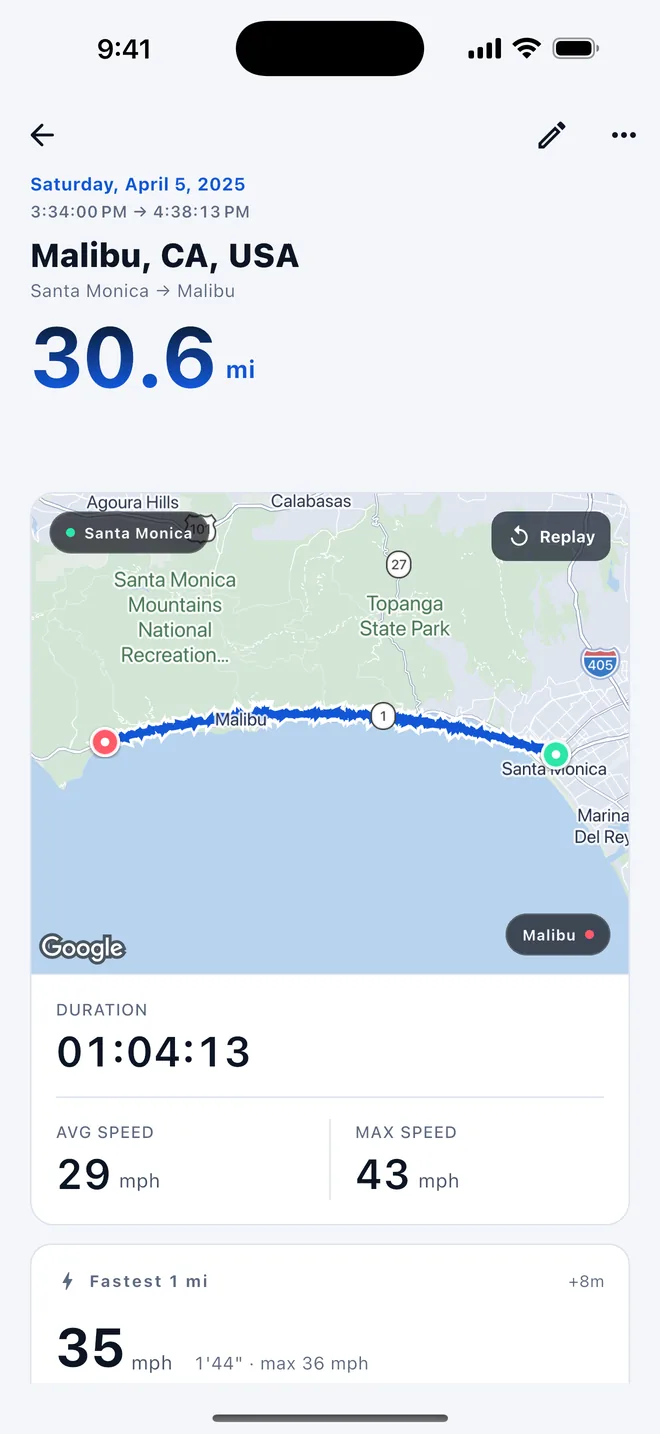
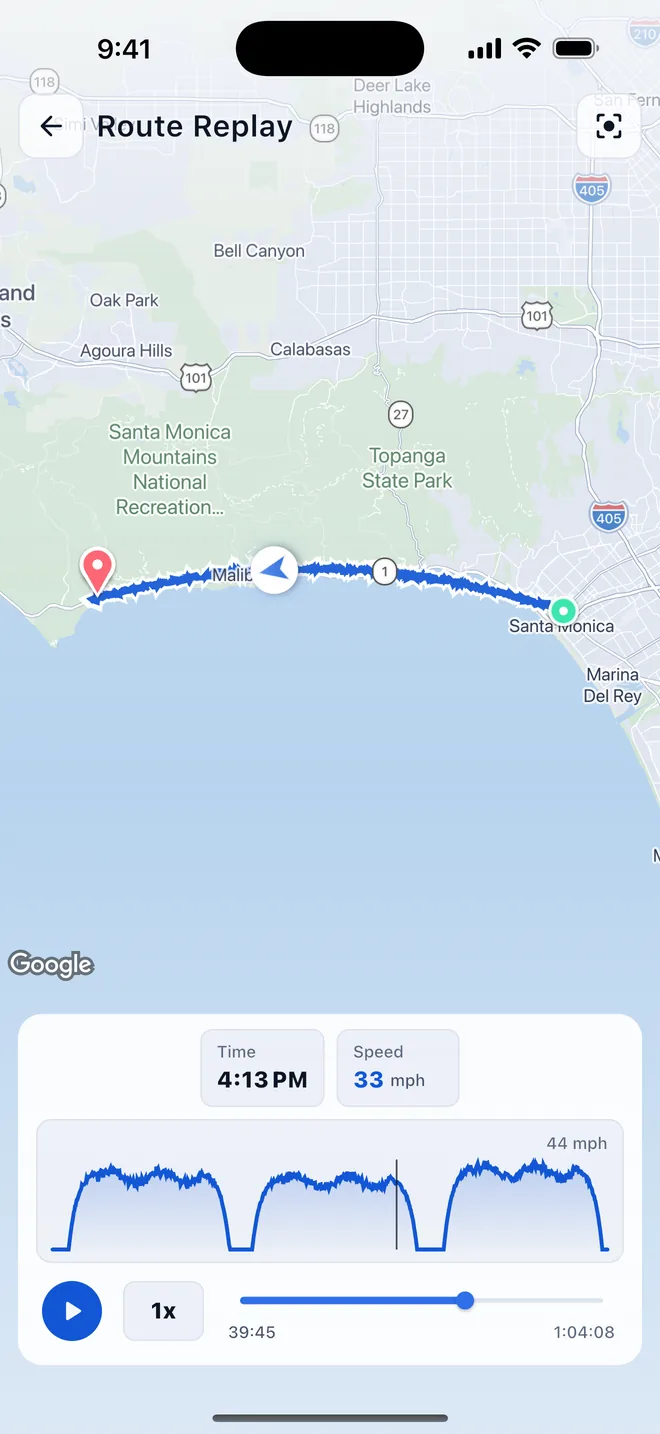
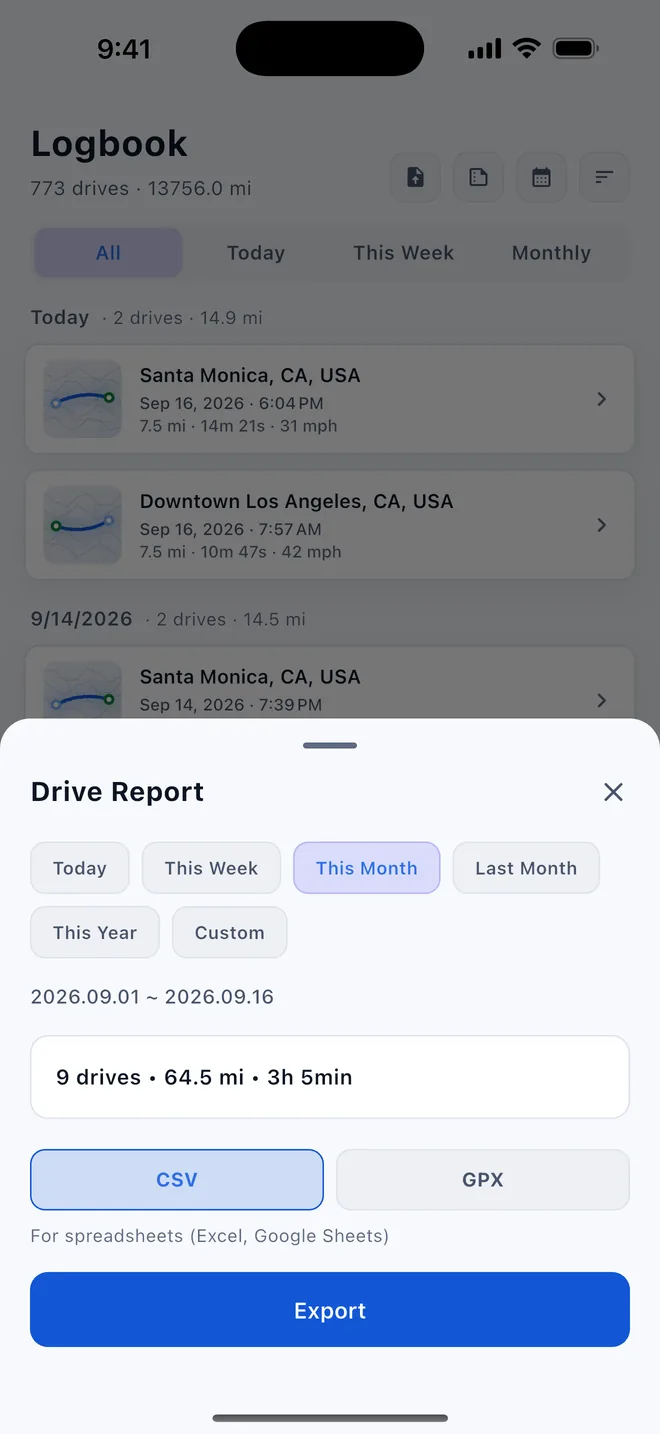
Each drive is saved on the phone with its route, time and speeds. You can replay it with the speed along the way, and export a single drive or a whole period as CSV or GPX.13
What the table doesn't show
- DashLog logs motorcycle rides and bike routes as well as car trips. On iPhone it can save each drive's GPX file to a folder you choose, and Apple Watch and Wear OS apps start and end a drive from your wrist.34 The automatic logging guide walks through the one-time setup.
- myTracks is made for any trip, not just driving, with waypoints, photos linked to a track and offline OpenStreetMap maps.5
- Driving Tracker adds the phone's motion sensors, so each drive gets G-force readings and harsh braking, acceleration and cornering events.6
- Geo Tracker has 10M+ downloads and is built for outdoor trips as much as driving. A navigation mode turns the map with your direction of travel.8
- Google Maps Timeline is the quickest answer to “where was I that day?”, with Places, Cities and World tabs for where you've been. You can edit it or delete any part of it.910
- Apple Maps Visited Places lets you search past visits by name, category, address or notes, and choose how long they're kept.11
- Enroad has 6.7K App Store ratings and 25K Google Play reviews, and adds share cards, clubs and a territory game on top of drive stats.121314
- Wheelz keeps a garage of your cars and ranks you against other drivers on leaderboards.1718
- MileIQ has you swipe each drive into business or personal before it goes into a report.20
- Driversnote has a web app for editing trips and a Teams plan where managers approve mileage claims.25
Also worth a look: Open Road, which records every drive, works with CarPlay and maps every road you've driven, with Pro for community features2728; Open GPX Tracker on iPhone, free with no in-app purchases and no data collected29; GPS Logger by BasicAirData on Android, free, open source and offline30; and Vehicle Trip Logbook Tracker on Android, which starts trips when a Bluetooth device connects and sells reports by subscription.31
Which one to use when
- You want every drive logged on its own, with nothing to sign up for. DashLog records each drive when the phone connects to CarPlay or the car's Bluetooth, free and without an account. On Android, Driving Tracker can do it with Premium.
- You want to see where you've been, not drive stats. Google Maps Timeline or Apple Maps Visited Places, already on your phone.
- You want route files for other apps. DashLog, myTracks, Geo Tracker, Open GPX Tracker and GPS Logger all export GPX. DashLog does it for one drive or a whole month at a time, and on iPhone can save each drive's file to a folder automatically.
- You ride as well as drive. DashLog records motorcycle rides and bike routes the same way as car trips, and myTracks and Geo Tracker are built for any kind of trip.
- You want to compare drives with friends. Enroad, Wheelz and Open Road have leaderboards, friends and clubs, and work with accounts.
- You need a mileage log for taxes or reimbursement. MileIQ and Driversnote classify business and personal trips and produce IRS-compliant reports. That's what they're made for.
Check where your drives go
A location history is about as personal as data gets, and listings are written by the people selling the app, ours included.
- A sign-in screen before the first drive means your drives are tied to an account. The privacy policy should say where they're kept and how to delete them.
- In the privacy section (App Privacy on the App Store, Data safety on Google Play), look for location under “Data Linked to You” or “Data Used to Track You”.
- Export one drive. A GPX or CSV file is a copy you keep, whatever happens to the app.
Frequently asked questions
Which drive tracker apps work without an account?
DashLog on iPhone and Android, myTracks on iPhone and Driving Tracker on Android say they need no account and keep drives on the phone, and Geo Tracker on Android says its tracks never go to a server. Enroad works without an account but uses one for leaderboards. Wheelz, MileIQ and Driversnote use accounts.
Is there a free app that logs every drive automatically?
DashLog is free and starts recording by itself when your phone connects to CarPlay or your car's Bluetooth, with no account. Enroad also records every drive for free, with Pro for replay and advanced stats. MileIQ is free for 40 drives a month and Driversnote for 15 trips a month.
Does Google Maps Timeline record my drives?
Once you turn it on with a Google account, Timeline saves your visits and routes and shows how you traveled, including driving. It's stored on each device unless you turn on an encrypted backup, and it can be exported as a JSON file. Google's help pages don't describe speed or per-drive statistics.
Is DashLog free?
Yes. DashLog is currently free to download and use, with no subscription and no account. Automatic recording, route replay, statistics and GPX or CSV export are all included.
Sources
All pages were read on 26 November 2026. Prices are the US prices shown on those pages that day.
- DashLog product page (GrayForge) · https://grayforge.app/dashlog/Automatic recording with CarPlay or car Bluetooth after one-time setup, no account, free with no subscription, recorded data, local storage, GPX and CSV export and GPX import. Checked 2026-11-26.
- DashLog privacy policy (GrayForge) · https://grayforge.app/dashlog/privacy_policy.htmlDrive records stored on the device, no DashLog server receiving routes, Firebase analytics, crash reports and remote config without precise routes. Checked 2026-11-26.
- DashLog GPS Drive Tracker, App Store (US) · https://apps.apple.com/us/app/id6769706684Car, motorcycle and bicycle logging, CarPlay or Bluetooth auto-recording, replay, export and import, Apple Watch app, auto-save GPX to a folder (version 1.4.7), iOS 16.2 requirement, privacy label (usage data and diagnostics, not linked to you). Checked 2026-11-26.
- DashLog GPS Drive Tracker, Google Play (US) · https://play.google.com/store/apps/details?id=com.grayforge.dashlogBluetooth auto-recording, Wear OS watch app, export and import, no account. Checked 2026-11-26.
- myTracks - The GPS-Logger, App Store (US) · https://apps.apple.com/us/app/id358697908No account, data on the device with iCloud sync, Diary Mode, export formats, optional Premium, iOS 18.6 requirement, Data Not Collected label. Checked 2026-11-26.
- Driving Tracker: GPS Trip Log, Google Play (US) · https://play.google.com/store/apps/details?id=com.richardblaha.drivingtrackerNo sign-up, offline storage on the device, sensor data, Premium features (automatic trip detection, heatmap, GPX and ZIP export, categories), subscription plans, Data safety section. Checked 2026-11-26.
- DrivingTracker website · https://drivingtrackerapp.com/“No account, no cloud”, drives never uploaded to a server, Android app. Checked 2026-11-26.
- Geo Tracker - GPS tracker, Google Play (US) · https://play.google.com/store/apps/details?id=com.ilyabogdanovich.geotrackerBackground recording, statistics, navigation mode, GPX/KML/KMZ, tracks stored locally and not sent to servers, voluntary donations, 10M+ downloads. Checked 2026-11-26.
- Manage your Google Maps Timeline (Android), Google Maps Help · https://support.google.com/maps/answer/6258979Timeline saved on each signed-in device, off by default, encrypted backup per device, travel modes, export of Timeline data. Checked 2026-11-26.
- Manage your Google Maps Timeline (iPhone & iPad), Google Maps Help · https://support.google.com/maps/answer/6258979Turning Timeline on in Google Maps for iOS, export saved as location-history.json. Checked 2026-11-26.
- View Visited Places in Maps on iPhone, Apple Support · https://support.apple.com/guide/iphone/view-and-manage-visited-places-iph0c2597c4f/iosEnd-to-end encrypted visits, sync across devices, search and filters, Keep Visits and Clear History, regional availability, iOS 26 and iOS 27 guides. Checked 2026-11-26.
- Enroad – Drive Tracker, App Store (US) · https://apps.apple.com/us/app/id6757245082Automatic trip tracking, Pro subscription for advanced stats, iOS 15 requirement, iPhone only, App Privacy label (identifiers and usage data used to track you), ratings. Checked 2026-11-26.
- Enroad - Drive Tracker, Google Play (US) · https://play.google.com/store/apps/details?id=io.uros.triprankAndroid listing, in-app purchases, Data safety section. Checked 2026-11-26.
- Enroad website · https://enroad.app/Background drive detection, trips stored as files on the phone with a cloud backup mirror, “Keep Everything on This Device” setting, free recording, which leaderboards and features are Pro. Checked 2026-11-26.
- Enroad pricing · https://enroad.app/pricingPro at $23.99 a year or $9.99 a month and what it includes. Checked 2026-11-26.
- Enroad privacy policy · https://enroad.app/privacyAccount data for sign-in and leaderboards, backed-up drives and GPS routes, use without an account, data copy as JSON. Checked 2026-11-26.
- Wheelz - Social Drive Tracker, App Store (US) · https://apps.apple.com/us/app/id6774287184Automatic trip detection, subscription prices, unlimited history with Pro, iOS 18 requirement. Checked 2026-11-26.
- Wheelz - Social Drive Tracker, Google Play (US) · https://play.google.com/store/apps/details?id=com.gigamow.wheelzAndroid listing, automatic tracking, leaderboards, Data safety section. Checked 2026-11-26.
- Wheelz privacy policy (Vortac Labs) · https://vortac.io/wheelz/privacyAccount information and Sign in with Apple or Google, saved drives, precise location, cloud infrastructure providers, retention. Checked 2026-11-26.
- MileIQ: Mileage Tracker & Log, App Store (US) · https://apps.apple.com/us/app/id578830929Automatic background tracking, business and personal classification, IRS-compliant reports, iOS 16 requirement. Checked 2026-11-26.
- Mileage Tracker & Log - MileIQ, Google Play (US) · https://play.google.com/store/apps/details?id=com.mobiledatalabs.mileiqAutomatic GPS tracking, IRS-compliant reports, secure cloud storage, free 40 drives a month. Checked 2026-11-26.
- MileIQ pricing · https://mileiq.com/pricingFree plan with 40 drives a month, Unlimited at $13.99 a month or $11.66 a month billed annually. Checked 2026-11-26.
- Installing MileIQ and account signup, MileIQ Help · https://support.mileiq.com/hc/en-us/articles/204237125-Installing-MileIQ-and-account-signupAccount with email and password, email verification, web dashboard, signing in on the phone app. Checked 2026-11-26.
- Mileage Tracker by Driversnote, App Store (US) · https://apps.apple.com/us/app/id924418916Automatic tracking once a certain speed is reached, categories, IRS-compliant logs, records stored securely, iOS 16.4 requirement. Checked 2026-11-26.
- Mileage Tracker by Driversnote, Google Play (US) · https://play.google.com/store/apps/details?id=com.driversnote.driversnotePDF or Excel logbook export, web app, iBeacon, IRS-compliant reports. Checked 2026-11-26.
- Driversnote pricing · https://www.driversnote.com/pricingFree plan (sign up, 15 trips a month), Pro at 11 USD a month excl. taxes, free iBeacon with a yearly plan bought on the web, iOS, Android and web. Checked 2026-11-26.
- Open Road: Drive Tracker GPS, App Store (US) · https://apps.apple.com/us/app/id6755834573Records every drive, CarPlay, map of driven roads, friends and convoys, Pro features, drives save and sync, iOS 18 requirement. Checked 2026-11-26.
- Open Road: Drive Tracker, Google Play (US) · https://play.google.com/store/apps/details?id=com.mikita.openroadAndroid listing, drive history, private-by-default sharing. Checked 2026-11-26.
- Open GPX Tracker, App Store (US) · https://apps.apple.com/us/app/id984503772Free, no ads, no in-app purchases, data kept private on the phone, GPX sharing. Checked 2026-11-26.
- GPS Logger (BasicAirData), Google Play (US) · https://play.google.com/store/apps/details?id=eu.basicairdata.graziano.gpsloggerFree and open source, offline recording, KML/GPX/TXT export, no data collected. Checked 2026-11-26.
- Vehicle Trip Logbook Tracker, Google Play (US) · https://play.google.com/store/apps/details?id=ee.prey.triplogAutomatic trip start, pause and resume on Bluetooth connect and disconnect, PDF/XLS/CSV reports with a subscription paid every six months. Checked 2026-11-26.
DashLog — GPS Drive Tracker
Records every drive on its own when your phone connects to CarPlay or your car's Bluetooth: route, distance, speed and stats, kept on your device. Free, with no account and no subscription.
Tell us and we'll fix the table.
Listings change. If a price, platform or limit above is out of date, including one about DashLog, send a note with the link and the table will be corrected.
grayforge.dev@gmail.com